Robots.txt Extension
Verify crawl & index control for any webpage — instantly from your browser. Check robots.txt, meta robots, HTTP headers, and canonicals in one click.




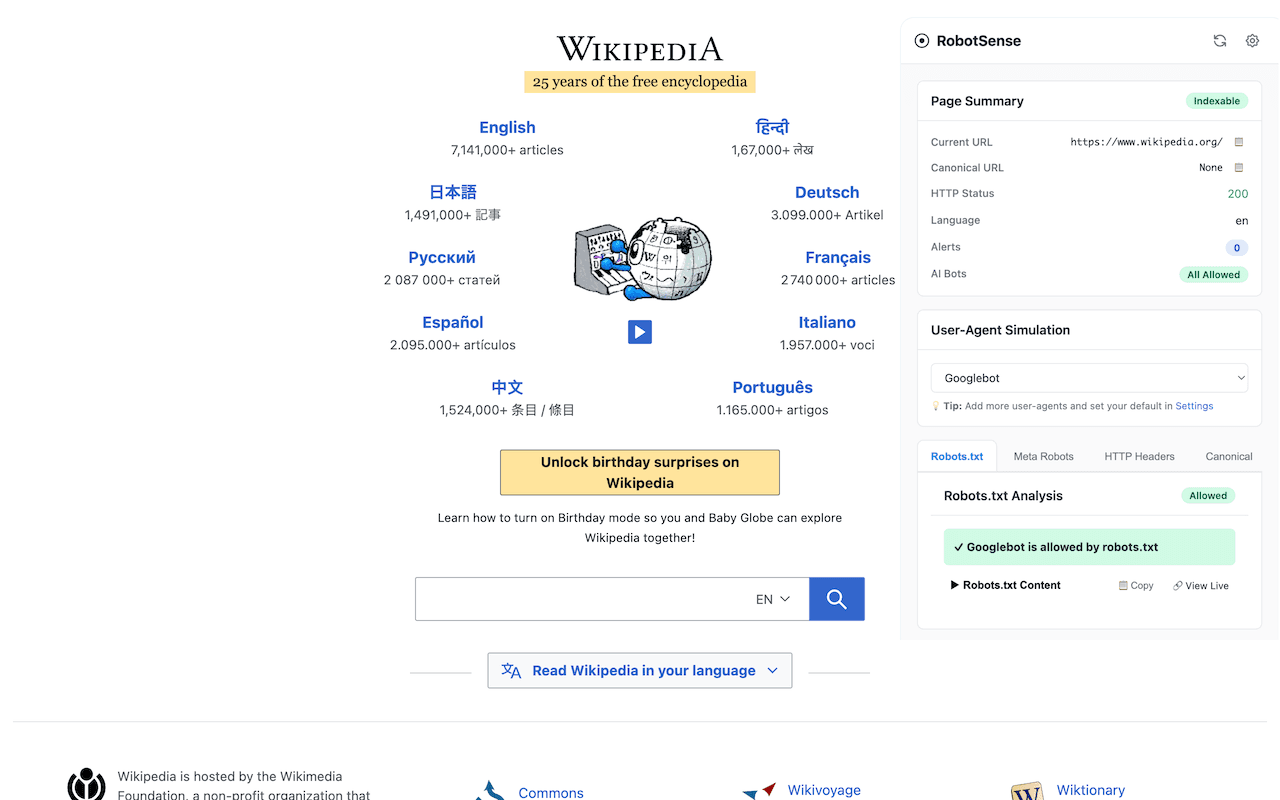
Wikipedia — Crawlers Allowed
Green status indicates the page is fully indexable by search engines.
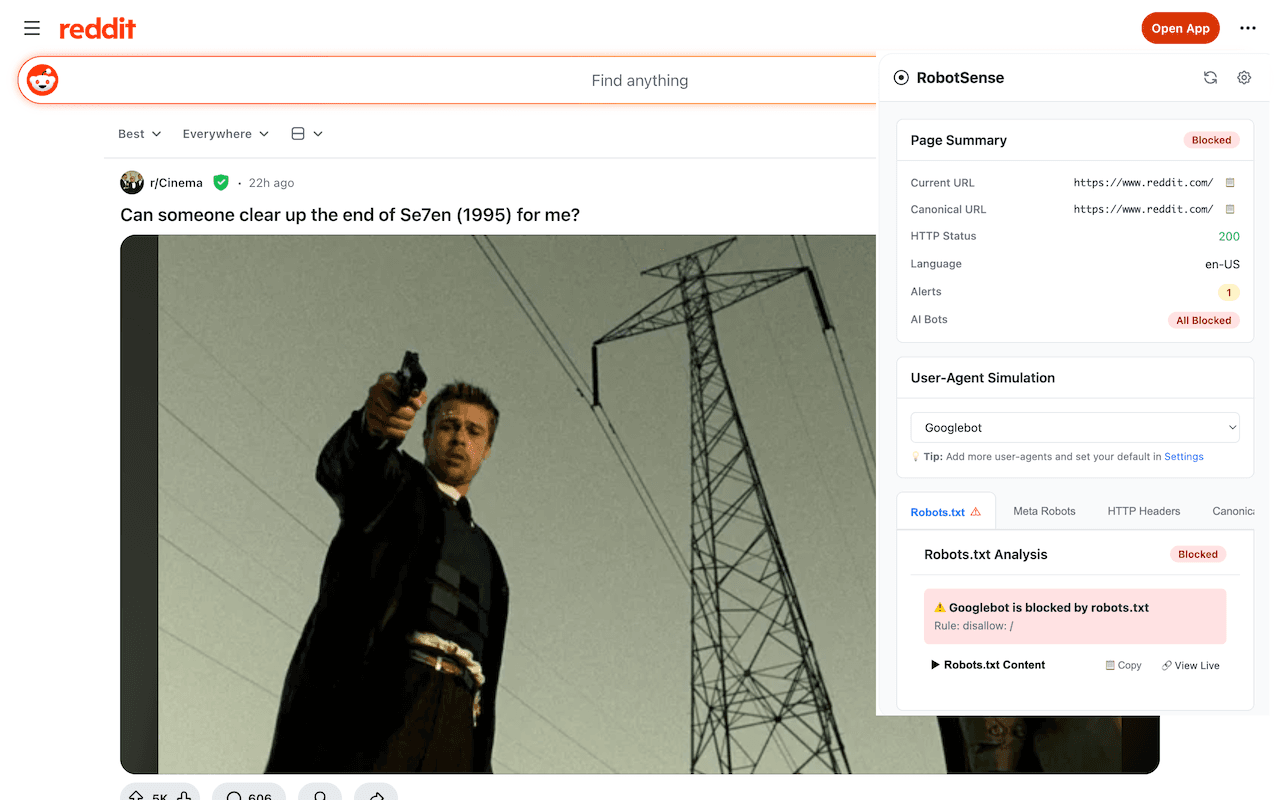
Reddit — AI Bots Blocked
Red alert shows AI crawlers like GPTBot are blocked via robots.txt.
Everything You Need to Check Crawl Control
Robots.txt Analysis
Instantly see if the current URL is allowed or blocked by robots.txt for any user-agent. View the full robots.txt content with syntax highlighting.
Meta Robots Parsing
Parse all meta robots directives including noindex, nofollow, nosnippet, max-snippet, and more. See which directives apply to all bots vs. specific crawlers.
X-Robots-Tag Headers
Analyze X-Robots-Tag HTTP headers that control indexing for non-HTML resources. Detect directives and target agents from response headers.
Canonical URL Detection
Detect canonical URLs from both HTML link tags and HTTP Link headers. Get alerts when sources conflict or canonicals point to different URLs.
AI Bot Access Checker
See at a glance which AI crawlers (GPTBot, ClaudeBot, Google-Extended, CCBot) are allowed or blocked by the site's robots.txt.
User-Agent Simulation
Simulate requests as Googlebot, Bingbot, Googlebot-News, Googlebot-Image, Yahoo Slurp, or any custom user-agent to test crawl rules.
How It Works
Install Extension
Add RobotSense Crawl Intelligence from the Chrome Web Store — it's free.
Browse Any Site
Navigate to any webpage. The extension automatically begins analyzing.
Open Side Panel
Click the toolbar icon to open the RobotSense side panel with all analysis tabs.
Review & Act
Check robots.txt rules, meta tags, headers, and canonicals. Switch user-agents to compare.
Ready to Debug Crawl Issues Faster?
Stop guessing why pages aren't getting indexed. See exactly what search engines and AI bots see — in real time.
Install Free on ChromeWhy You Need a Robots.txt Extension
The Complexity of Modern Crawl Control
Modern websites use multiple layers to control how search engines and AI bots interact with their content. A robots.txt file sets crawl-level rules. Meta robots tags control indexing at the page level. X-Robots-Tag HTTP headers extend those directives to non-HTML resources. And canonical URLs signal the preferred version of duplicate content. Checking all of these manually for every page is slow and error-prone — especially when rules conflict across layers.
All Crawl Signals in One Panel
The RobotSense Crawl Intelligence extension consolidates every crawl and index signal into four clear tabs: Robots.txt, Meta Robots, HTTP Headers, and Canonicals. As you browse, the extension automatically fetches and parses each layer, showing you exactly what directives apply to the current page. No more switching between tools or digging through page source.
AI Bot Visibility
With the rise of AI crawlers like GPTBot (OpenAI), ClaudeBot (Anthropic), Google-Extended, and CCBot, website owners need to know which AI bots can access their content. The extension provides an at-a-glance AI bot status indicator showing how many AI crawlers are blocked by the site's robots.txt — helping you understand your data exposure to AI training and inference systems.
User-Agent Simulation for Precise Debugging
Different crawlers often receive different rules. The extension lets you switch between Googlebot, Bingbot, Googlebot-News, Googlebot-Image, Yahoo Slurp, and custom user-agents to see how each crawler would be treated. This is essential for debugging issues where a page is indexable for one bot but blocked for another.
Color-Coded Indexability at a Glance
The toolbar icon changes color as you browse: green means the page is fully indexable, amber indicates warnings (such as nofollow directives), and red means the page is blocked from indexing. Tab badges highlight specific issues, so you can spot problems without even opening the panel.
Built for SEOs, Developers, and Content Teams
Whether you're an SEO professional auditing client sites, a developer deploying new pages, or a content team ensuring articles are discoverable — this extension gives you the information you need without leaving your browser. Check any competitor's crawl setup, verify deployment changes, or audit your own site's indexability in seconds.
Frequently Asked Questions
What does the RobotSense Crawl Intelligence extension do?
The RobotSense Crawl Intelligence Chrome extension lets you instantly verify how search engines and AI bots interact with any webpage. It checks robots.txt rules, meta robots directives, X-Robots-Tag HTTP headers, and canonical URLs — all from a convenient side panel in your browser.
Is the Chrome extension free to use?
Yes, the RobotSense Crawl Intelligence extension is completely free. Install it from the Chrome Web Store and start checking crawl and index control for any website with no limits.
How do I install the RobotSense Chrome extension?
Visit the Chrome Web Store listing, click "Add to Chrome", and confirm the installation. The extension icon will appear in your browser toolbar. Click it or open the side panel to start analyzing any webpage.
Can I check if specific AI bots like GPTBot or ClaudeBot are blocked?
Yes. The extension checks robots.txt rules for all major AI crawlers including GPTBot (OpenAI), ClaudeBot (Anthropic), Google-Extended, CCBot, and others. It shows you at a glance which AI bots are allowed or blocked for the current page.
What is the difference between robots.txt, meta robots, and X-Robots-Tag?
Robots.txt controls crawl access at the URL-path level before a page is fetched. Meta robots tags are HTML directives that control indexing and link-following after a page is fetched. X-Robots-Tag is an HTTP header that provides the same directives as meta robots but works for non-HTML resources like PDFs and images. The extension checks all three layers.
Does the extension work on any website?
Yes, the extension works on any website you visit. It fetches and parses the robots.txt file from the site's root, reads meta robots tags from the page HTML, analyzes X-Robots-Tag HTTP headers, and detects canonical URLs — giving you a complete crawl and index control picture.
What user-agents can I simulate?
The extension supports simulating requests as Googlebot, Googlebot-News, Googlebot-Image, Bingbot, and Yahoo Slurp. You can also enter any custom user-agent string to test how a site's robots.txt rules apply to specific crawlers.
What do the toolbar icon colors mean?
The extension icon changes color to indicate indexability status: green means the page is indexable, amber indicates warnings (like a nofollow directive), and red means the page is blocked from indexing by one or more directives.
How is this different from the online Robots.txt Validator?
The online Robots.txt Validator checks the syntax and structure of a robots.txt file. The Chrome extension goes further by analyzing all crawl-control layers (robots.txt, meta robots, HTTP headers, and canonicals) for the actual page you're viewing in real-time, with user-agent simulation and visual status indicators.
Does the extension send my browsing data to any server?
The extension performs all checks locally in your browser. It fetches robots.txt directly from the website you're visiting and parses page content client-side. No browsing data is sent to RobotSense or any third-party server.
Related Tools
Robots.txt Tester
Test whether a URL is allowed or blocked for any bot, and see exactly which rule applies.
Robots.txt Validator
Validate robots.txt syntax with our robots.txt validator. Check for errors, warnings, and best practices.
Robots.txt Generator
Build a custom robots.txt file with our visual builder. Select bots, define rules, and download.
Bot Verification Tool
Verify if a bot is legitimate by checking its IP, user-agent, and DNS records.
Bot Directory
Browse every known crawler by operator — user agents, robots.txt configuration, and verification methods.